About Smart Traveler
Smart Traveler, the official State Department app for U.S. travelers, invites you to see the world with easy access to frequently updated official country information, travel alerts, travel warnings, maps, U.S. embassy...
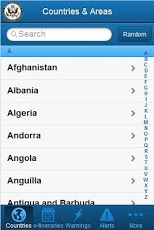
Smart Traveler, the official State Department app for U.S. travelers, invites you to see the world with easy access to frequently updated official country information, travel alerts, travel warnings, maps, U.S. embassy locations, and more.With Smart Traveler, you can create personal itineraries, add notes, and organize your trips.Smart Traveler also provides access to the State Department's Smart Traveler Enrollment Program (STEP). Free STEP enrollment enables the State Department to better assist you in emergencies such as natural disasters, unrest in foreign countries, or lost/stolen passports overseas. During your travels, STEP can help family and friends reach you in an emergency.Smart Traveler also provides quick access to the Department's Consular Affairs Facebook and Twitter pages. And for a bit of fun, you can shake your device to get information on a random country!
Previous Versions
Here you can find the changelog of Smart Traveler since it was posted on our website on 2013-08-22 08:17:51.
The latest version is 1.2.0 and it was updated on 2024-04-23 11:11:10. See below the changes in each version.
Smart Traveler version 1.2.0
Updated At: 2012-08-07
Changes: Several fixes and updates
Smart Traveler version 1.2.0
Updated At: 2012-08-07
Disclaimer
Official Google Play Link
We do not host Smart Traveler on our servers. We did not scan it for viruses, adware, spyware or other type of malware. This app is hosted by Google and passed their terms and conditions to be listed there. We recommend caution when installing it.
The Google Play link for Smart Traveler is provided to you by apps112.com without any warranties, representations or guarantees of any kind, so access it at your own risk.
If you have questions regarding this particular app contact the publisher directly. For questions about the functionalities of apps112.com contact us.